ZenGram: The Distraction-Free Instagram Client for Aspirants & Content Creators
⚡ The 10-Second Executive Summary
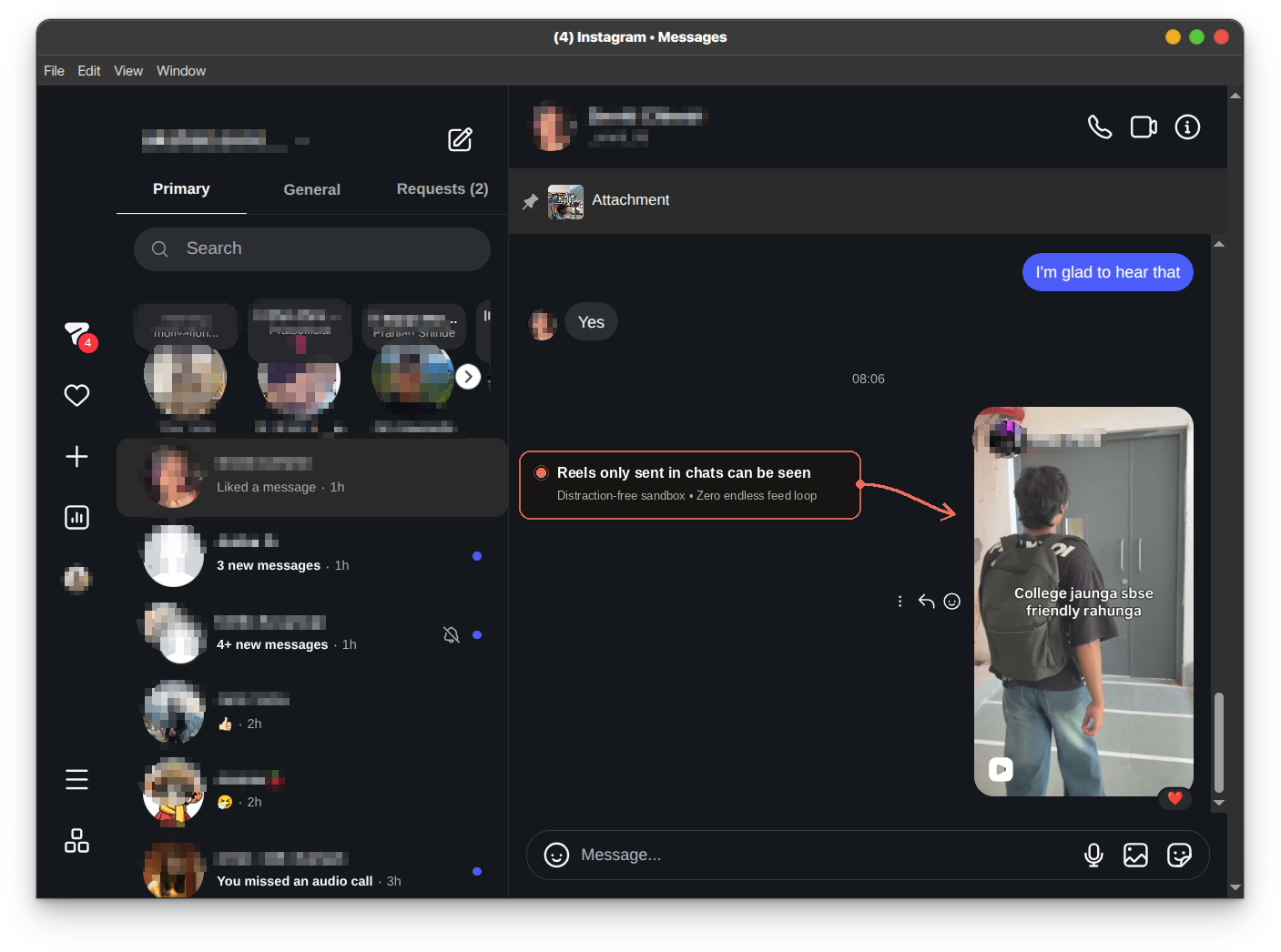
ZenGram is an open-source, client-side Instagram wrapper that completely blocks the infinite Home Feed, Explore page, and Reels swipe loop. It routes every session straight to Direct Messages, preserves the Saved collection for revision notes, enables a functional + Create button for content creators to "Post & Ghost", and unlocks hardware WebRTC voice/video calls. Zero data collection, 100% direct connection to Meta SSL endpoints.
The Problem: The Modern Social Media Casino
If you are an exam aspirant preparing for GATE, JEE, NEET, or UPSC, or a serious content creator, Instagram is a paradoxical weapon:
- For Aspirants: Study partners share quick doubt clarifications or high-yield physics/math animations over DMs, and professors post revision sheets in Saved collections. But clicking a link accidentally drops you into an infinite doomscroll vortex.
- For Creators: You need to post high-value reels or carousels and respond to sponsor inquiries or audience messages, but the moment you open the app, Meta's recommendation algorithms hijack your dopamine system for the next 45 minutes.
The Solution: Architectural Isolation
ZenGram solves this not by preaching willpower, but through deterministic UI constraint:
| Feature | Official Instagram App / Web | ZenGram Client |
|---|---|---|
| Landing Page | Infinite algorithmic feed (Explore/Reels) | Direct Messages (/direct/inbox/) |
| Reels Tab & Explore Grid | Unrestricted addictive autoplay loops | Completely stripped & blocked |
| Single-Reel Chat Sandbox | Swiping up plunges into infinite reels | Only sent reels play in-thread; 0 swipe-up |
| Saved Collection (/saved) | Nested behind profile & feed distractions | Directly accessible for revision cheat-sheets |
| Creator Publishing (+ Create) | Surrounded by explore triggers & notifications | Clean modal dialog: "Post & Ghost" |
| Voice & Video Calls | Requires mobile app or full browser | Hardware-accelerated WebRTC unlocked |
| Privacy & Data Security | Ad tracking, device telemetry, analytics | 100% Direct Meta SSL (Zero intermediate servers) |
1 How ZenGram Empowers Aspirants & Students
When you are in deep preparation mode, context switching is fatal. ZenGram provides three critical guardrails:
- Strict Inbox Isolation: Typing
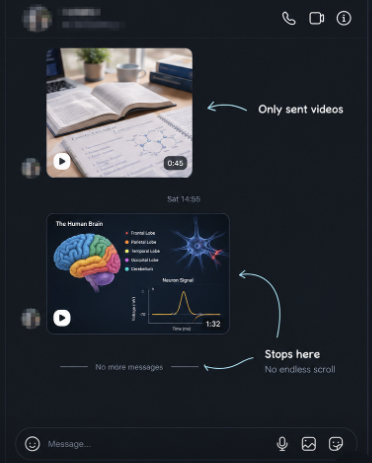
instagram.comor clicking any navigation element immediately keeps you inside/direct/inbox/. - The Single-Reel Chat Sandbox (Only Sent Reels Can Be Seen): If a friend or study buddy sends a physics animation, formula breakdown, or concept reel in chat, you can watch it directly inside the thread. But the moment it ends, playback stops. There is zero swipe-up to the next reel, zero suggested discover algorithms, and no explore rabbit hole.
- Saved Formula Sheets & Revision Diagrams: Unlike naive blockers that wipe the entire site, ZenGram's routing engine explicitly whitelists
/savedand single post links (/p/post_id). Aspirants can freely bookmark circuit diagrams, organic chemistry reaction maps, and theorem cheat-sheets.
2 The Creator's Advantage: "Post & Ghost"
The greatest trap for digital creators is consuming other people's work when they should be producing their own.
+ Create button is directly integrated. Creators can tap +, trigger the native system file picker, upload carousels, reels, and stories, answer brand sponsorship DMs, and immediately close the client. Create without being consumed.
3 The Zero-Data-Theft Architecture
We believe digital transparency is non-negotiable. ZenGram is built on three immutable privacy principles:
- 100% Client-Side: ZenGram runs locally on your computer or phone browser. It is a lightweight DOM cleaner and routing guard.
- Direct Meta SSL Handshake: All authentication tokens, cookies, and chat messages travel exclusively between your machine and official Meta endpoints (
https://www.instagram.com) over encrypted HTTPS. - Zero Middleman Servers: We do not operate proxy servers, telemetry backends, or data pipelines. You can inspect every line of code on GitHub.
4 Universal Setup Guide (All Operating Systems)
🪟 Windows Setup (1-Click, Zero-Config)
Windows users have two ultra-fast ways to run ZenGram:
:: Option 1: Double click the provided launcher
ZenGram-Windows.bat

:: Option 2: Run directly via NPX in PowerShell or CMD
npx zengram
Under the hood: If Electron is installed, it launches the full isolated desktop client. If Node is not installed, it natively launches Windows' built-in Microsoft Edge in dedicated standalone app mode (msedge --app=https://www.instagram.com/direct/inbox/), giving you an instantaneous, borderless desktop window with zero downloads.
🐧 Linux Setup (Portable AppImage)
We pre-compiled a complete, self-contained AppImage that runs on any Linux distribution (Ubuntu, Arch, Debian, Fedora, openSUSE):
# 1. Make the binary executable
chmod +x ZenGram-x86_64.AppImage

# 2. Launch ZenGram
./ZenGram-x86_64.AppImage
📱 Mobile Setup: 3 Tested Ways (Android & iPhone)
Since Instagram updates frequently break third-party binary patchers (like ReVanced), ZenGram gives you three clean, durable, and 100% open-source mobile methods:
Method 1: Instant Standalone PWA (iOS & Android — 15 Seconds, Zero-Install)
This is the cleanest, most battery-efficient solution that never breaks with app updates:
- On iPhone (iOS): Open Safari → Navigate to
https://www.instagram.com/direct/inbox/→ Tap the Share button (box with upward arrow) → Tap "Add to Home Screen" → Name it ZenGram and tap Add. - On Android: Open Chrome or Brave → Go to
https://www.instagram.com/direct/inbox/→ Tap the three dots (⋮) → Tap "Install App" (or "Add to Home screen").
Why this works: Launches directly into your Direct Messages inbox in full borderless standalone mode (no Safari/Chrome address bars), persists your session in the native OS Keychain, and completely bypasses the explore feed.
Method 2: Full Element-Blocking via Userscript (Android & iOS)
If you want the feed completely stripped and the single-reel sandbox active inside your mobile browser:
- On Android: Install Kiwi Browser or Firefox Mobile (from Google Play) → Install the Tampermonkey extension → Tap to install zengram.user.js.
- On iPhone: Install Orion Browser from the App Store (supports Chrome extensions on WebKit) → Add Tampermonkey → Install zengram.user.js.
Result: The Reels and Explore tabs are completely eradicated, and reels sent in chat pause after one play with zero swipe loop.
Method 3: Native Android Standalone APK (Dedicated App)
For Android users who prefer an isolated, dedicated application without touching their browser:
- 🎬 Insta-App-Like Reel Posting (Post & Ghost): Includes a dedicated floating Reel Studio button. Choose any video from your gallery or record on the fly with your camera, trim, format in 9:16, add captions, and share. The instant your Reel publishes, ZenGram auto-deflects you straight back to
/direct/inbox/—so you build your audience without ever falling into the doom-scroll trap. - 👁️ View-Once Disappearing Media Unlocked: Ephemeral "view once" photos and videos in DMs (which normally show "Sent a photo. Open the Instagram app to view" and refuse to open in web views) are unlocked by ZenGram. View them with permanent access (zero self-destruct timers) and save them directly to your phone's Gallery with one tap.
- 🛡️ Clean & Telemetry-Free: 100% open-source Android SDK implementation with direct Meta SSL connections, WebRTC video calling, and zero background battery drain.
Get ZenGram on GitHub & Try the Live Simulator
Take control of your focus. Inspect the source code, download the Windows & Linux launchers, or run the interactive live simulator in your browser right now.