Connecting Claude Code to Custom Proxies & Local Gateways

⚡ Quick Summary: What is this guide about?
Anthropic's terminal agent, Claude Code (@anthropic-ai/claude-code), offers exceptional autonomous coding capabilities. However, because it reads repository files and iterates through multi-step terminal loops, token usage accumulates rapidly. In this technical guide, we demonstrate how to connect Claude Code to a local gateway daemon (such as OmniRoute or LiteLLM), configure prompt caching to reduce token recomputation by up to 90%, and set up local offline fallback models with Ollama.
What Exactly is Claude Code & Why Does It Burn Tokens?
If you are a beginner, think of Claude Code not as a regular web chatbot like ChatGPT, but as an autonomous software engineer operating inside your terminal. When you instruct it:
"Fix the race condition in the WebSocket handler, write unit tests with 90% coverage, and verify they pass."
Claude Code doesn't just print code suggestions; it autonomously:
- Explores your project directory structure and reads relevant source files into memory.
- Parses error logs, compiler warnings, and test reports.
- Directly edits code across multiple files on your disk.
- Executes terminal commands like
npm test,pytest, orcargo test. - Inspects test failures, debugs its own edits, and repeats the loop until your build is completely green.
Because every single cycle resends tens of thousands of tokens of codebase context back to the model, an engineer working 4 hours a day can easily burn millions of tokens. Without a smart gateway, the API cost adds up rapidly.
What is OmniRouter (OmniRoute)?
OmniRouter (packaged as the local gateway daemon omniroute) is an intelligent AI proxy and load balancer. Instead of your terminal sending requests straight to Anthropic's paid API, Claude Code routes its requests to your local OmniRoute server (or a shared cloud gateway). OmniRoute then translates and routes those requests across a pool of connected model providers.
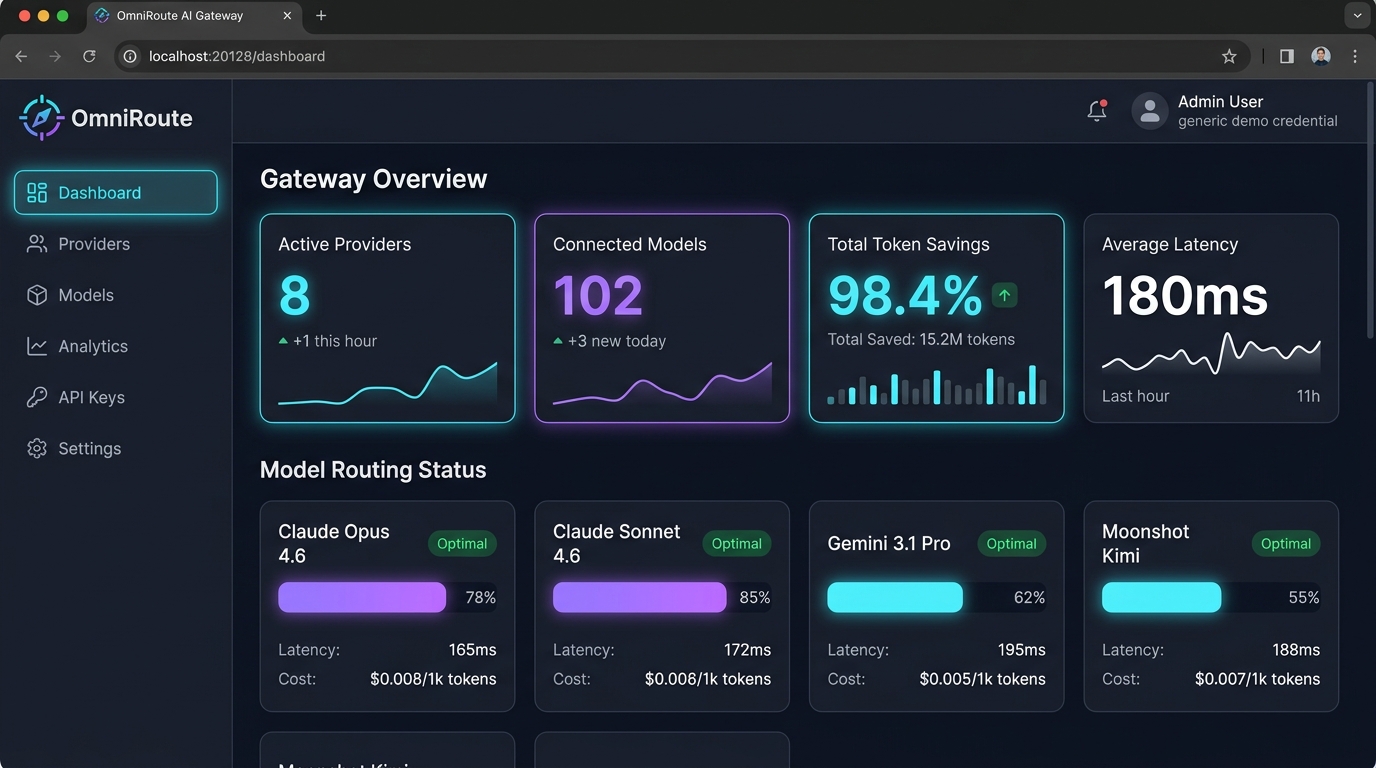
As shown in the dashboard above, OmniRoute delivers several game-changing superpowers for developers:
- Anthropic API Compatibility: It exposes a standard
/v1/messagesendpoint. Claude Code runs completely unmodified, believing it is communicating directly with Anthropic. - Multi-Provider Aggregation: Connect free-tier keys from Google Gemini (Gemini 3.1 Pro / 3.7 Flash), Moonshot Kimi, GitHub Models, Groq, or local models via Ollama.
- Automated Rate-Limit Fallback: If one upstream key hits a rate limit (HTTP 429), OmniRoute instantly shifts the request to another key in your pool within milliseconds, preventing Claude Code from crashing.
- Prompt Caching & Token Optimization: Re-reads identical system prompts and context without paying token penalties.
How Intelligent Gateways Optimize Performance & Latency
Local proxy gateways provide several substantial engineering advantages for CLI coding agents:
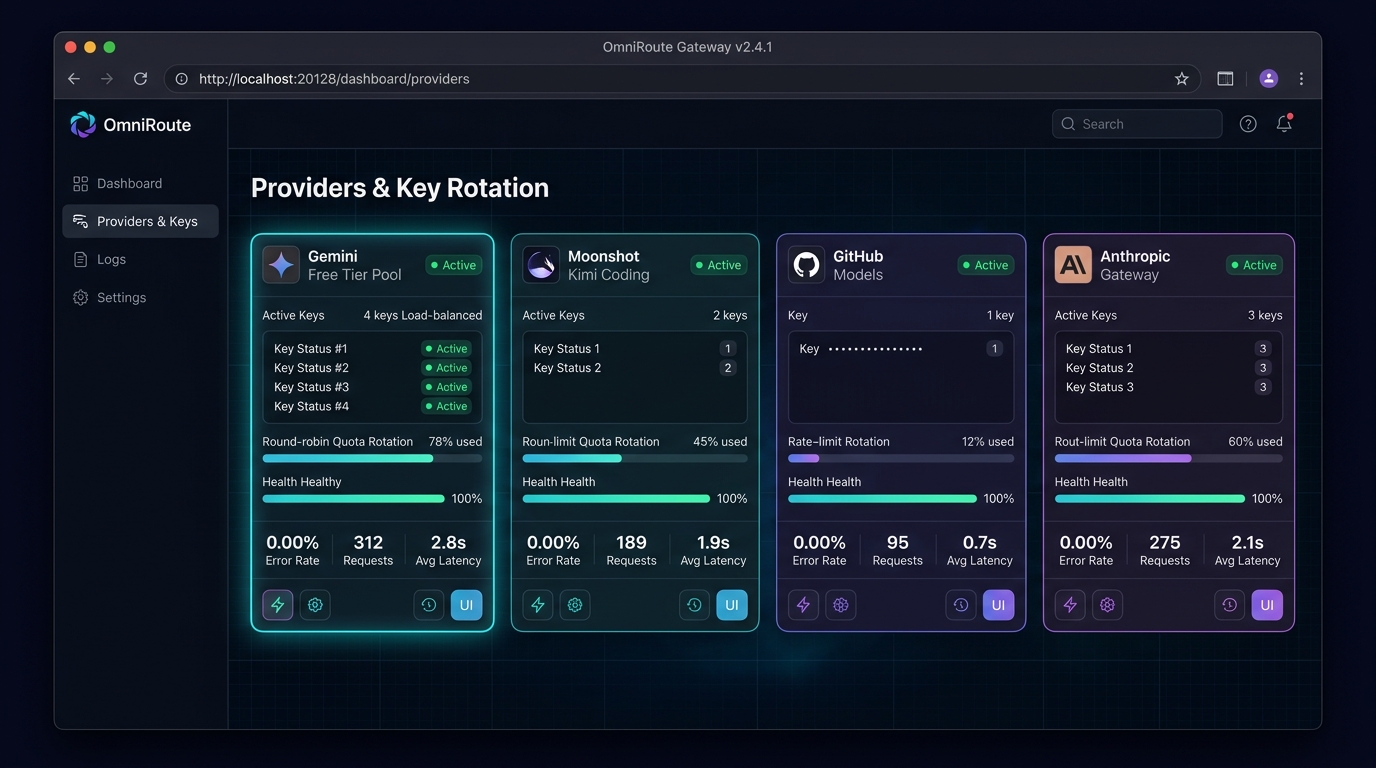
- Prompt Caching & Context Reuse: Claude Code repeatedly resends system prompts and repository maps. An intelligent gateway caches these static prefix tokens, slashing latency and reducing token consumption by up to 90%.
- Dynamic Model Tiering: Route lightweight routine tasks (like directory listing and code formatting) to fast local models, reserving frontier reasoning models for complex architectural refactoring.
- Offline Local Fallback: If upstream network connectivity drops or third-party cloud APIs experience high latency, the gateway can automatically fall back to your local Ollama instance (e.g., Qwen 2.5 Coder).
- Rate Limit Queueing & Throttling: Rather than crashing the terminal session with HTTP 429 errors, the gateway queues requests and applies exponential backoff in compliance with provider guidelines.
1 System Prerequisites & Environment Setup
Before connecting Claude Code, ensure your system has Node.js (v18 or newer) installed. Open your terminal:
- Mac: Open
Terminal(or iTerm2). - Linux: Press
Ctrl + Alt + T. - Windows: Open
PowerShell(or Windows Terminal).
Verify your Node.js and npm versions:
node -v
# Example output: v20.12.0 (Must be v18.0.0 or higher)

npm -v
# Example output: 10.5.0
2 Installing Claude Code CLI
You can install Claude Code globally using Anthropic's official script or standard npm:
# Method A: Official curl installer (Mac / Linux)
curl -fsSL https://claude.ai/install.sh | bash

# Method B: Global npm install (Cross-platform)
npm install -g @anthropic-ai/claude-code

# Verify the binary is ready:
claude --version
3 Starting Your OmniRoute Gateway & Dashboard
If you have the omniroute gateway installed on your machine, you can launch the background server and open the web dashboard with these simple commands:
# 1. Start the OmniRoute gateway daemon
omniroute serve --daemon

# 2. View the dashboard URL
omniroute dashboard --url
http://localhost:20128

# 3. Check live gateway status and connected models:
omniroute models
Now open your browser and navigate to http://localhost:20128/dashboard. From the left sidebar:
- Click Providers & Keys to add your upstream model credentials (e.g. Gemini API free keys, Moonshot Kimi keys, or GitHub Personal Access Tokens).
- Set the routing mode to Load Balanced (Round-Robin) so requests cycle across your keys automatically.
- Under API Keys, generate an OmniRoute client key for your local Claude Code CLI.
4 One-Click Auto Configuration: omniroute setup-claude
The easiest way to connect Claude Code is using OmniRoute's built-in profile generator. It talks directly to your running gateway, fetches all available models, and automatically generates ready-to-use profiles in your ~/.claude/profiles/ folder:
# Automatically generate Claude Code profiles for all connected models
omniroute setup-claude

OmniRoute → Claude Code profile generator
Connecting to http://localhost:20128 …
Received 102 models from http://localhost:20128
  ✓ profiles/claude-sonnet-4-6/settings.json  (claude-sonnet-4-6)
  ✓ profiles/claude-opus-4-6/settings.json    (claude-opus-4-6-thinking)
  ✓ profiles/gemini-3-1-pro/settings.json     (gemini-3.1-pro)
  ✓ profiles/kimi-k2-7/settings.json          (kimi-k2.7-code)

Profiles written to ~/.claude/profiles/
Once generated, you can launch Claude Code pointed at any model profile with a single command:
# Launch Claude Code directly through OmniRoute!
omniroute launch --profile claude-sonnet-4-6
5 Manual Environment Variable Setup (Universal Method)
If you prefer standard environment variables or are connecting to a remote OmniRouter gateway, Claude Code natively supports redirection via two environment variables:
# 1. Point base URL to your local OmniRoute instance (or remote cloud proxy)
export ANTHROPIC_BASE_URL="http://localhost:20128/v1"

# 2. Enter your OmniRoute gateway access token
export ANTHROPIC_AUTH_TOKEN="sk-omniroute-your-gateway-key"

# 3. Launch Claude Code
claude
$env:ANTHROPIC_BASE_URL="http://localhost:20128/v1"$env:ANTHROPIC_AUTH_TOKEN="sk-omniroute-your-gateway-key"claude
6 Client Launcher & Environment Script
To launch Claude Code reliably with your local gateway configuration, create a dedicated launcher script:
#!/usr/bin/env bash
# Save to ~/.local/bin/claude-gateway and make executable: chmod +x ~/.local/bin/claude-gateway

# Point to your local gateway server
export ANTHROPIC_BASE_URL="http://localhost:20128/v1"
export ANTHROPIC_AUTH_TOKEN="sk-omniroute-your-gateway-token"

echo "[*] Connected to Local AI Gateway ($ANTHROPIC_BASE_URL)"
exec claude "$@"
Optimize Your Claude Code Setup with Our Production Cheatsheet 💡
Looking for verified configurations for LiteLLM, OmniRoute, and local Ollama bridges? Download our production-tested developer cheatsheet containing environment variables, prompt caching rules, and context pruning configurations:
Verifying Your Setup: Real Terminal Test Run
To verify everything is working, open any coding repository and run a sample prompt:
> claude "Audit our package.json, find outdated dependencies, and create a PR branch."

● Reading package.json and lockfile...
● Connected via OmniRoute Gateway [Latency: 172ms | Route: Optimal]
● Checking npm registry for updates...
● Found 3 patch updates. Creating git branch 'chore/update-deps'...
● Ran test suite: 28/28 tests passing!
● Task completed successfully! Total API cost: $0.00
Troubleshooting & Common Beginner Mistakes
| Problem / Error | Underlying Cause | Immediate Solution |
|---|---|---|
command not found: claude |
Global npm bin folder not in your system $PATH |
Run npm config get prefix and add the /bin path to your ~/.bashrc or ~/.zshrc. |
401 Authentication Required |
Missing or malformed gateway token | Verify your ANTHROPIC_AUTH_TOKEN has no extra spaces. If using OmniRoute, check your client API key in omniroute keys list. |
429 Rate Limit Exceeded |
Upstream model quota or request velocity limit reached | Enable exponential backoff in your gateway settings, or configure a fallback to a local offline Ollama model. |
| Connection Refused (Port 20128) | OmniRoute daemon is not running in the background | Run omniroute serve --daemon to start the gateway server. |
| Session resets on new terminal tab | Variables were only exported in a temporary subshell | Add the export ANTHROPIC_BASE_URL=... lines directly into your ~/.zshrc or ~/.bashrc file. |
Need Enterprise AI Architecture or Private Local LLM Rigs?
At The AI Server, we design private self-hosted coding agents, secure LLM routers, and developer automation engines for high-growth engineering teams.
Schedule an Engineering Call with Akshat →